Skanda is learning Tamil from my Amma. Online. Every Saturday morning at 8 am. She sits in Chennai, and he is from Stouffville.
This is not the first time he’s learning Tamil. He spent two years in a classroom setting through YRDSB’s Indigenous Languages and International Languages program. While many languages were offered, he chose Tamil amongst the choices we had for him: Telugu, Tamil, and Mandarin.
The only problem? He had a teacher of Sri Lankan origin. First year went OK—he got through the alphabet. Second year—he whined through and learned words. I understood his pain. I speak Chennai Senthamil, and Praneetha speaks like Appa Rao (Kamal) in Dasavatharam. (OK... OK... She speaks much better than Appa Rao). And he, in class, had to listen to Sri Lankan Tamil.
That being the issue, he didn’t want to go to Tamil school and said he’d learn from his paatti. And so... started this year’s classes—online.
The Problem Reveals Itself
Amma recommended that he be assessed using Tamil Nadu government textbooks. These are available online as PDFs via the government site. (On that note, I recommend reading up on Samacheer Kalvi—it’s a fascinating standardisation of Tamil Nadu’s education system.)
Since the classes are online, we’re around during sessions—to address setup issues, necessary software and hardware, and any other assistance as needed. On those occasions, I noticed Skanda would look up Tamil words he wasn’t familiar with using Google Translate. It would sometimes also be to resolve ambiguity about the meaning of a word. This would happen only if both grandson and grandmother couldn’t agree on a certain usage.
The problem was clear: the lookup process was slow, distracting, and pulled him out of the learning flow. My phone was small. The Claude web interface required uploading specific pages every time. Google Translate gave literal meanings but no context, no grammar notes, no cultural explanation—nothing that would help a 10-year-old who reads at a 14-year-old level understand why a word works the way it does.
The Weekend Options Menu
Well, since I was free on one of those weekends, I thought I should address the problem. I had several options:
S1. Give my phone to him to use the Claude app Simple, straightforward. But the phone is very small. It would eat up daily limits quickly. And honestly, a phone during class? That’s a distraction waiting to happen.
S2. Look for Okular alternatives Are there PDF viewers with embedded dictionaries that can help define and explain words? I searched. There was nothing reliable out there.
S3. Write a plugin for Okular This seemed promising at first. But I quickly discovered that Okular’s plugin system only supports Generator plugins for adding new document format support, not for extending the sidebar UI. The sidebar has fixed built-in tabs: Thumbnails, Contents/TOC, Annotations, and Bookmarks—these are hardcoded and not extensible through plugins.
S4. Extend Okular to add AI functionality Given the limitations of S3, this looked like too much work. And it would likely hit the same architectural walls.
Oh yes! We are Linux folks here. Specifically, Arch-based EndeavourOS with i3 window manager. This detail matters because it shaped what came next.
Enter Claude, My Coding Partner
Armed with this analysis, I asked Claude for recommendations. It suggested three options:
- Separate i3 Window (traditional tiling approach)
- Floating Overlay Window (always-on-top approach)
- Browser-Based Solution (simplest)
I went with Option 2—a floating overlay window. Why? Because in the i3 window manager world, I could make it appear and disappear instantly with a keyboard shortcut, position it exactly where I wanted, and it wouldn’t disrupt Skanda’s reading flow.
The Three-Hour Build
Claude and I built the first versions together. Then I took it to Cursor to polish and add a logging mechanism (because I wanted to track token usage and see which pages Skanda studied most).
In about three hours, I had a working beauty that my son would test and complain about. ;-)
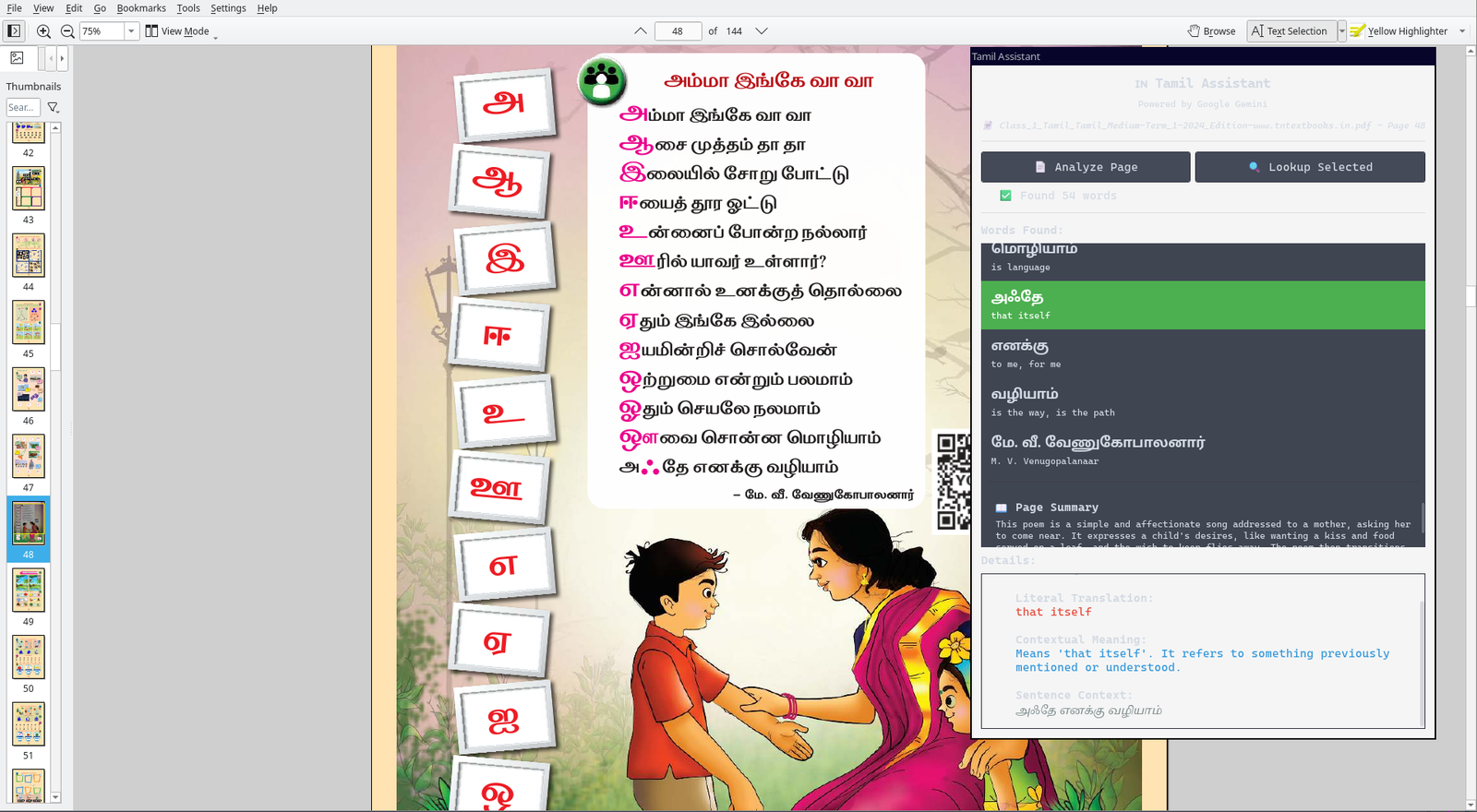
But here’s what made this tool different from just using Claude directly:
It Understands the Learner
The system isn’t just translating words. It’s been designed with Skanda’s specific context in mind:
- A 10-year-old with advanced English comprehension (reads novels meant for 14-year-olds)
- Beginner Tamil (1st grade textbook level)
- Learning French at school
- Being taught by his grandmother from India
Every explanation it generates compares Tamil grammar to English concepts he already knows. It explains the cultural context. It shows how words work in sentences, not just dictionary definitions.
It Stays Out of the Way
Press Mod+Y (or launch from the application menu), and the Tamil Assistant appears as a floating panel on the right side of the screen. The PDF stays in full view. Skanda can:
- Click “Analyse Page” to get every Tamil word on the current page
- Click any word to see detailed explanations with grammar notes
- Select a specific word in the PDF and click “Lookup Selected” for instant context
When he’s done? Close the window or press Mod+Y again. No fuss.
It Makes Learning Contextual
When Skanda clicks on a word, he doesn’t just get “குடும்பம் = Family.” He gets:
Tamil Word: குடும்பம்
Literal Translation: Family
Contextual Meaning: Refers to the family unit, including parents, children, and close relatives. In Tamil culture, family is very important and often includes extended family members.
Sentence Context: “என் குடும்பம் பெரியது.” (My family is large)
Grammar Notes: Noun, nominative case. The word is formed from … (You get the point)
This is what makes independent study possible. He can understand why things work, not just memorise translations.
The Technical Choices That Mattered
I made some deliberate technical decisions that kept this project from becoming a weeks-long odyssey:
REST API over Python SDK: Instead of wrestling with Google’s Python SDKs (which have frequent API changes and version conflicts), I used direct HTTP requests. More reliable, simpler, and works everywhere.
i3 Scratchpad Integration: The panel can toggle on/off instantly, follows across workspaces, and doesn’t take permanent screen space. Perfect for the i3 workflow.
Page-to-Image Processing: Rather than trying to extract text from PDFs (which often fails with Tamil fonts), I render pages as images and send them to Google’s Gemini vision model. It handles layout and context better than text extraction ever could.
Comprehensive Logging: Every session creates a detailed log showing which pages were analysed, which words were looked up, and token usage. As a PM, I can’t help myself—I measure everything.
The Real-World Test
While Skanda watched me build it, he has yet to test it out. That will be the next time, when he picks up his homework.
What I Actually Built
Looking back, I didn’t build a Tamil learning app. I built something more specific:
A tool that removes friction from a 10-year-old’s Saturday morning Tamil lessons with his grandmother, who lives 8,000 miles away.
It had to:
- Work with the exact PDF textbooks Amma uses
- Give explanations at his reading level (high) for his Tamil level (beginner)
- Do not interrupt his video call flow
- Be fast enough that he’d actually use it
- Run on Linux because that’s what we use
This is what I love about building things as a PM who codes: I’m not building for a market segment. I’m building for Skanda, on a Saturday morning, trying to understand why “குடும்பம்” is different from “உறவினர்கள்”.
The Broader Lesson
I’ve built a bunch of projects this past year—a bylaw search system for our town, an understanding of Sleep via a voyage through cells, and a portfolio terminal with semantic search. Each one started the same way: noticing friction in someone’s day-to-day life and thinking, “I can fix that.”
The Tamil Assistant isn’t sophisticated AI research. It’s weekend engineering to solve a specific problem for a specific person. But that’s the beauty of having technical skills as a PM—you can address problems at the speed of a weekend, not the speed of a product roadmap.
Skanda still whines sometimes during his Tamil lessons. But now it’s about verb conjugations being hard, not about not understanding what words mean. That’s progress.
And Amma? I’ll be telling her about this when she wakes up.
And Skanda knows that this tool is an aid and secondary, only after he has clarified with his paatti or he is out of help.
அஃதே எனக்கு வழியாம்
The Tamil Assistant is open source and available on GitHub. If you’re teaching a young learner any Indian language with PDF textbooks, feel free to adapt them. Or better yet, let me know what works and what doesn’t. I’m always happy to hear from other parents solving similar problems.
Made with ♥️ for young Tamil learners bridging cultures.